LivePhish
- 4.8
- Rating
- 100.00K
- Installs
- Free
- Price

 Analysis by App-foxy
I came away from LivePhish feeling that it is a focused listening app rather than a general-purpose music service. Its purpose is clear: it gives Phish fans a place to watch selected livestreams and explore the band’s complete concert archive. That narrow focus is its biggest strength. I never had to sift through unrelated artists, playlists, podcasts, or algorithmic recommendations to reach the music I actually wanted.
At the same time, this is not the kind of app I would recommend automatically to every music listener. It makes the most sense if live Phish recordings are already important to you, or if you want a dedicated way to follow the band’s concert history. Someone looking for broad music discovery, a large mixed-artist library, or a conventional radio-style experience will probably feel more comfortable with a general streaming service.
The app comes from nugs.net and sits in the Music & Audio category. It is free to install, available to everyone in terms of content rating, and has built a strong store presence with a 4.8 average from around four thousand ratings. The install figure is over one hundred thousand, which suggests a specialized audience rather than a mass-market music tool. That distinction matters when deciding whether its paid elements are likely to be worthwhile.
You May Also Like

 Pandora - Music & Podcasts
Pandora’s Music Is Easy to Start, but Harder to Recover
Pandora’s strength is its low-effort path from a seed to a station. Its weak spot is how much confidence it asks you to place in connection, setup, and quiet recovery.

 8 Ball Pool
 Is Built on Rivalries, Rematches, and Routine
A close look at the rivalries, rematches, shared routines, and unanswered safety questions that turn a quick pool match into a persistent mobile community.

 Samsung Music
’s Quiet Strength Is Playing What You Already Own
Its reach comes less from spectacle than from dependable access to a personal library. That simplicity is both the app’s strongest retention engine and its ceiling.

 AccuWeather: Weather Radar
AccuWeather Review: A Quick, Clear Forecast for Everyday Decisions
For everyday plans, the best forecast is the one you can understand quickly. AccuWeather makes rain timing, radar, and local conditions easy to act on, with a few trade-offs.

 Hill Climb Racing
Why Hill Climb Racing Still Turns Crashes Into One More Run
A tiny car, a bumpy hill and one more upgrade: Hill Climb Racing keeps resurfacing because its simple chaos makes every near-miss feel personal.

 AliExpress - Shopping App
AliExpress Makes Global Shopping Feel Personal, but Shoppers Bear the Risk
AliExpress turns a global marketplace into a pocket-sized discovery engine. Its reach is useful, its shopping loop compelling, and its trade-offs easy to miss.
More From Our News Desk
View All News


What using the archive feels like
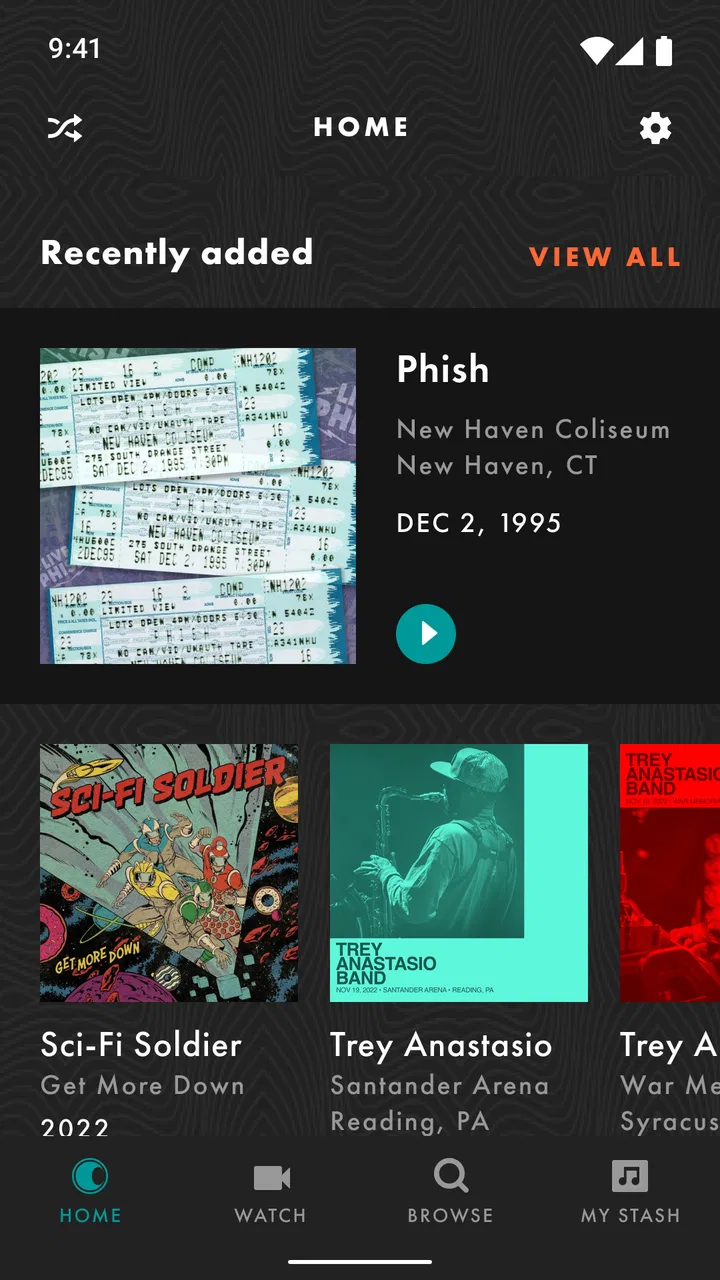
The most valuable part of the experience is the way the archive changes how I listen. With an ordinary album app, I usually choose a studio record and move on. Here, the appeal is comparing performances, revisiting a particular era, or choosing a concert based on mood rather than simply selecting a song. A familiar track can feel like a different listening decision when it is connected to a full live set.
I found that this works best when I treated the app as a concert library instead of a replacement for my everyday music player. For example, after work I might choose a complete show and let it run in the background while cooking. On another day, I could use the archive to find a specific performance mood, then stay with the entire set rather than jumping between unrelated tracks. That workflow feels more intentional than ordinary shuffle listening.
The livestream side serves a different purpose. It is for the fan who wants to be present around a live event, while the archive is better for slower, repeat listening. Keeping those two uses separate in your mind helps set realistic expectations. A livestream is about timing and participation; an archive is about convenience, comparison, and returning to performances later.
One practical tip is to decide before opening the app whether you want a full-show experience or a quick listen. If you have only a few minutes, browsing a deep concert archive can become a distraction in itself. If you have a longer stretch of time, choosing a complete performance first is more satisfying than repeatedly searching for isolated songs.
A strong fit for dedicated listeners
I would point longtime Phish listeners toward this app first. The dedicated archive gives the music more context than a collection of popular tracks would. It is also useful for someone discovering the band through live recordings and wanting to understand how the concert experience differs from studio material.
It can also suit households where one person is the main fan and others occasionally listen along. The free installation lowers the barrier to trying it, while the focused catalog means the interested listener does not need to build a separate personal system for organizing live Phish material. Still, the value depends heavily on how often you return to that catalog.
Casual listeners should be more selective. If you only know a few songs and want a broad introduction to many artists, this app is too specialized. You may spend more time deciding whether a particular show is right for you than actually listening. A general streaming platform is the better first stop for variety, discovery tools, and mixed playlists.
How it differs from ordinary music apps
The comparison with mainstream streaming services is not simply about the size of the library. Those services are designed to help me move quickly from one artist to another. LivePhish is designed around depth within one musical world. That makes it less convenient for broad discovery but more meaningful when I want to stay with Phish and explore live variations.
Video platforms can be useful for finding individual performances, but they are usually built around search results and recommendations rather than a dedicated concert archive. That distinction changes the listening habit. Here, I am not relying only on whatever clip happens to be easiest to find; I am approaching the band through a more concentrated space.
There is a trade-off, though. A specialist service asks for more commitment from the user. If I want one song from a completely different artist after listening to a show, I may need to leave the app. For me, that is acceptable when the goal is a Phish-focused session, but inconvenient when I want one application to handle every part of my music day.
Paying attention to the purchase decision
The app itself is free, but it includes in-app purchases ranging from $9.99 to $149.99 per item. That is a wide span, so I would not treat the free download as the whole financial decision. Before paying, I would check exactly what the selected purchase unlocks, whether it matches my listening habits, and whether I am buying a single event, archive access, or another type of content offered inside the app.
This is one of the places where a little patience protects the user. A person who watches occasional livestreams may value a different purchase from someone who repeatedly explores the archive. I would also avoid buying simply because a show is currently prominent on the screen. The best choice is the one that fits how often you actually listen, not the one that creates the strongest momentary excitement.
Because the higher end of the purchase range is substantial, I would involve anyone else who may use the same device or account before confirming a transaction. That is especially sensible in a family setting. The free entry point is helpful, but it should not encourage careless spending once the app presents paid content.
Trust, controls, and everyday privacy choices
I treat privacy and account controls as part of setting up a dependable listening routine, not as an afterthought. Before settling in, I check which alerts I actually want and make sure purchase confirmations are handled through my device’s usual safeguards. That careful start also makes it easier to decide which settings are worth revisiting as my listening habits change.
What I look for before settling in
When I review a music app, trust is not only about whether playback works. I also consider how clearly the app presents account actions, paid choices, and any requests for access. LivePhish is easier to approach when I treat those areas as decisions to inspect rather than screens to rush through. I would read the wording around sign-in, purchases, and notifications, and I would avoid granting anything that does not make sense for the way I plan to use the app.
I do not assume that a music app needs every possible permission simply because it is installed on a phone. My own habit is to check the operating system’s permission manager after installation and revisit it if my use changes. If I only want to listen at home, I have less reason to enable optional access than I would for a feature that clearly depends on it. This keeps the experience aligned with my actual purpose.
The minimum operating system listed for the current release is Android 10. That is useful to know before downloading, particularly if you keep an older phone for music. Compatibility is a basic trust issue: an app should not become part of my routine until I know the device can run the version being offered. The current version is 4.2.3, so I would also check that my phone has enough system support for the present release rather than relying on an outdated installation.
Handling accounts and purchases carefully
Account control matters more here than it might in a simple offline player because the app combines livestream access, archive listening, and paid items. I would use an account I can recognize and manage, keep purchase confirmation enabled through the device’s store settings, and review active subscriptions or transaction history through the platform account when needed. Those are ordinary safeguards, but they are especially worthwhile when individual purchases can reach $149.99.
I also prefer making one deliberate purchase at a time. After buying, I would confirm what became available and keep a record of the receipt. This creates a clear trail if I later use another phone or need to understand which content belongs to my account. It is a small workflow, but it prevents the common confusion between installing an app, signing in, and actually owning or accessing a particular item.
For shared devices, I would not leave the purchase screen open for another person to use casually. A music app can feel harmless because the content is entertainment, yet the available purchase range deserves the same attention as any other digital storefront. The most trustworthy experience is partly created by the user’s own account habits.
Moments when data awareness matters
Livestream viewing is the clearest data-sensitive situation. Video and live audio can use more mobile data than ordinary browsing, so I would prefer a reliable Wi-Fi connection unless I had deliberately checked my mobile plan. I would also avoid starting a stream just before leaving home without knowing how long I expect to watch. That simple choice reduces the risk of an unpleasant data surprise and makes the session less likely to stop halfway through.
Long archive sessions deserve similar planning. If I am listening through a complete show while traveling, I would prepare the phone, battery, and connection before departure. I would not assume that every listening situation will behave like a downloaded album in a traditional offline music app. Instead, I would test the exact workflow I need before depending on it for a flight, commute, or area with unreliable reception.
Notifications are another area where I want control. Livestream reminders can be useful for a committed fan, but repeated alerts can become noise if I only open the app occasionally. I would keep only the notifications that help me catch events I genuinely care about and turn off the rest through the operating system if they become distracting. This is a good example of user agency: the app can be valuable without being allowed to dominate the phone.
I also keep the app’s data practices in view through its privacy information and the controls exposed by my device. I do not infer that a particular permission or collection practice exists without seeing it stated. My approach is more practical: read the available explanation, choose the least intrusive settings that still support my use, and reconsider those choices after an update. That is more reliable than assuming that every music app handles information in the same way.
Useful habits for a smoother listening routine
My first advanced habit is separating discovery from commitment. I browse a show, listen long enough to decide whether its character suits me, and only then consider a purchase. This prevents the archive’s abundance from turning into impulsive spending. It also helps me identify whether I prefer complete concerts, selected performances, or livestream participation before I pay for a larger item.
The second is using a listening plan. Instead of opening the app with no idea what I want, I choose a theme such as a full show, a particular period, or a relaxed background session. That makes the specialist catalog feel less overwhelming and helps me notice differences between performances rather than endlessly scrolling.
The third is checking the practical conditions before an important stream. I confirm the account I intend to use, review the purchase details if payment is involved, connect to stable Wi-Fi, and silence unrelated notifications. None of these steps is glamorous, but together they protect the part that matters: being able to enjoy the event without troubleshooting in the middle of it.
A fourth useful habit is keeping the app’s role limited when necessary. I would not force it to become my universal music player if I already use another service for daily playlists. Using LivePhish specifically for Phish concerts can be a better arrangement than replacing every other audio tool. The app’s specialization becomes an advantage when I let it do the job it was built around.
Where the experience may frustrate
The archive can create choice overload. A large collection is exciting at first, but it can also make a simple listening decision feel like research. New listeners may not know which show to choose, and people with limited time may find the browsing process less efficient than opening a familiar playlist in a general service.
The narrow catalog is another limitation. If my listening changes constantly between artists, genres, and podcasts, I would rather use an app designed for that variety. Switching between services is not a serious problem for everyone, but it adds friction when I want one queue, one history, and one set of playback habits.
Paid access also requires attention. The free installation is a convenient way to enter the experience, yet the purchase range means I would not describe the app as automatically inexpensive for regular use. Someone who only wants occasional background music may find the cost difficult to justify, while an enthusiastic fan who returns to the archive often may see more value in the dedicated format.
Finally, a specialist app rewards familiarity with the band. If I am still deciding whether Phish’s live approach suits me, I would sample carefully before committing. The app can support discovery, but it is not necessarily the gentlest introduction for someone who wants a short, curated overview rather than extended concert listening.
My recommendation after weighing the trade-offs
I recommend LivePhish to fans who want a dedicated home for Phish livestreams and concert recordings, especially those who enjoy comparing performances or giving a full show their attention. The combination of a free starting point, a focused archive, and a clear connection to live listening makes it more purposeful than a generic artist page inside a broad streaming app.
I would skip it if my main goal is discovering many unrelated artists, building mixed playlists, or avoiding paid digital content altogether. I would also be cautious if I use an older phone below Android 10, rely heavily on mobile data, or do not want to manage account purchases and notification settings. Those are not reasons to dismiss the app; they are signs that its focused design may not match my routine.
The app is free and rated for everyone, but the real decision is personal: how much value do I place on a specialized Phish listening space? Its 4.2.3 release is the current version, and the long-running app has been available since September 12, 2011, which gives it a clear identity rather than the feel of a temporary companion tool. Still, I would judge it by my own listening frequency, not by its age or store rating.
My cautious verdict is positive. I like the idea of using it as a deliberate concert archive and livestream destination, and I think it serves that purpose better than trying to recreate the same experience through scattered searches elsewhere. I would install it freely, inspect the account and device choices, test my preferred listening setup, and only then decide whether a paid item earns its place. The best reason to choose LivePhish is not convenience alone, but the chance to listen to Phish as a living concert catalog rather than just a list of tracks.
FAQs for LivePhish
01What is LivePhish?
LivePhish is an official music streaming and concert archive app focused on Phish performances. It gives fans access to live recordings, full shows, selected tracks, and related concert content in one place. The app is designed for listeners who want to explore the band’s extensive performance history, follow recent shows, and enjoy professionally recorded live music on a mobile device.
02Does LivePhish require a subscription or payment?
LivePhish offers both free and paid content, although availability can vary depending on the current catalog and promotions. Some features, recordings, or listening options may require a subscription or individual purchase. Before downloading, users should review the pricing details shown in the app store and inside the application, especially if they want unlimited access to the complete concert archive.
03Can I listen to LivePhish recordings offline?
Offline listening may be available for eligible content, depending on the account type, purchase, and current app features. When supported, users can download recordings while connected to Wi-Fi and play them later without using mobile data. It is worth checking the download controls and storage requirements, since full concerts can occupy considerable space on an Android or iOS device.
04Is LivePhish available for both Android and iPhone?
LivePhish is intended for mobile users and may be available through official app stores for supported Android and iOS devices. Compatibility can depend on the operating system version, device model, and regional availability. Users should download the application only from Google Play or the Apple App Store and verify the listed requirements before installing it on an older phone or tablet.
05What kind of music and features can I find in LivePhish?
The main attraction is Phish’s live-performance catalog, including concerts, songs, setlists, and recordings from different periods of the band’s career. Depending on the version of the app and your access level, you may also find show browsing, playlists, search tools, favorites, and streaming controls. Audio quality and available formats can differ between recordings, so serious listeners should check each release’s details.
Pros
- Official access to a large collection of live Phish recordings.
- High-quality audio options are available for many shows.
- New concerts and releases are added regularly.
- Shows can be saved for convenient offline listening.
- Useful search and browsing tools help find specific performances.
Cons
- A subscription is required for most premium content.
- The catalog may feel overwhelming for new Phish listeners.
- Offline downloads can use substantial device storage.
- Audio quality and availability vary between recordings.
- The app is mainly useful to dedicated Phish fans.

LivePhish
Gallery